
DocsSound
Microphone and preamp
Choosing a microphone and the preamp that shapes the character of your voice; every knob and preset of the channel strip in the tradition of tube preamps and FET compressors.
Choosing a microphone
Choose the microphone you want to use in the Microphone box at the bottom of the home screen (also in Settings › Microphone). The level bar should move when you speak. You can’t change the microphone during the countdown or while recording.
If the microphone you chose is unplugged, Mixapod switches to the system default microphone.
What the preamp is
The preamp is a channel strip your voice passes through before it is recorded: it is inspired by rack units that combine a tube microphone preamp with a FET compressor. It cleans up your voice, evens it out and adds character.
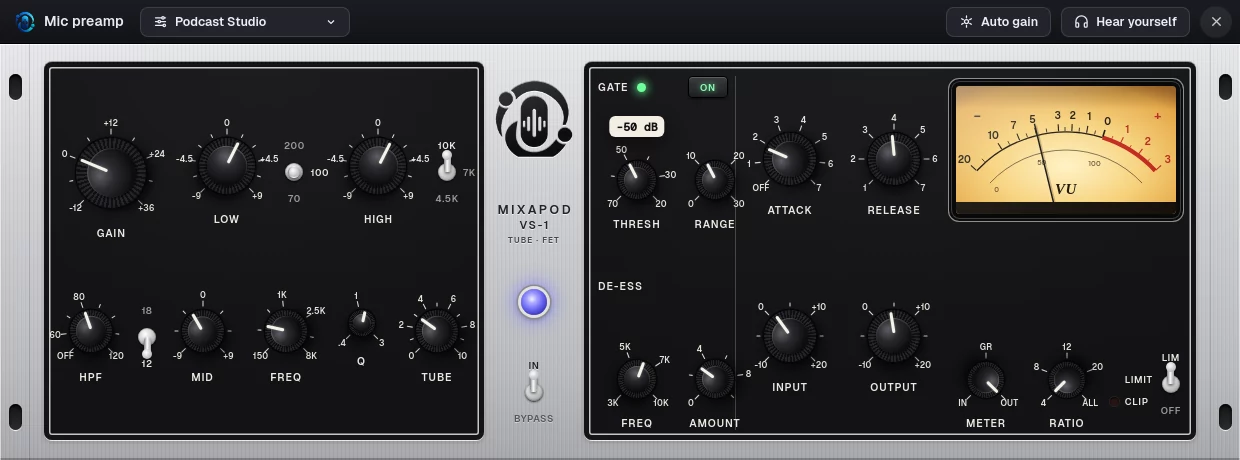
- It opens with the Preamp button in the Microphone box; the selected preset is shown next to the button.
- The sound after the preamp is written to the recording, just like a hardware preamp. It can’t be undone after recording; if you’re not sure, start with Clean or Natural.
- The preamp is also applied to the live call, so the sound your guests hear changes too.
- On new installations the preamp is on and Clean is selected: it doesn’t touch the sound; only a −1 dB safety limiter works.
If you use an external mixer or preamp
If your sound already goes through a mixer, a processor on your sound card or a hardware preamp, check I use an external mixer / preamp in the Microphone box. The preamp is taken out of the chain completely and the microphone is recorded as it is.
You can’t change this option during the countdown or while recording. The preamp window, however, can be opened during recording too, and its knobs can be turned: changes go into the recording immediately.
Processing order
Your sound goes through these stages, in the order used in broadcasting:
GAIN → HPF → Gate → Tube → EQ → Compressor → De-esser → Limiter
Top strip
| Control | What it does |
|---|---|
| Preset menu | Chooses built-in presets and your own presets; saves the current sound as a preset |
| Auto gain | Listens to you speak normally for six seconds and sets GAIN so your speech averages −18 dBFS |
| Hear yourself | Sends your voice, after the preamp, to your headphones. Don’t use it with speakers: the sound feeds back |
Preamp section (left)
| Knob | Range | What it does |
|---|---|---|
| GAIN | −12 … +36 dB | Input gain. Each microphone remembers its own gain; presets don’t touch it |
| LOW | −9 … +9 dB, 1.5 dB steps | Low shelf EQ; switch: 70 / 100 / 200 Hz |
| HIGH | −9 … +9 dB, 1.5 dB steps | High shelf EQ; switch: 4.5 / 7 / 10 kHz |
| HPF | Off, 60 … 120 Hz | High-pass filter: rumble, desk vibration and “p” pops. Switch: 12 / 18 dB/octave |
| MID | −9 … +9 dB | Mid band: to cut mud (250–400 Hz) or add presence (3–5 kHz) |
| FREQ | 150 Hz … 8 kHz | Frequency of the mid band |
| Q | 0.4 … 3 | Width of the mid band: a small value is wide, a large value is narrow |
| TUBE | 0 … 10 | Tube warmth: mostly 2nd harmonic. Around 3 is subtle, 7 and above is clearly audible |
Gate and de-esser
| Knob | Range | What it does |
|---|---|---|
| GATE ON | On / off | Turns down room noise in the moments you aren’t speaking |
| THRESH | −70 … −20 dB | Sound below this level is turned down |
| RANGE | 0 … 30 dB | How far it is turned down. It doesn’t cut completely, so breaths stay natural |
| DE-ESS FREQ | 3 … 10 kHz | The region where “s” and “sh” sounds are: 5–7 kHz for male voices, 6–9 kHz for female voices |
| AMOUNT | 0 … 10 dB | The most the “s” sounds are turned down |
The gate is a soft expander: it has a short hold time so it doesn’t cut off the ends of words, and a threshold difference between opening and closing. Its light glows green while the gate is open.
Compressor
The knobs of an 1176-style FET compressor:
| Knob | Range | What it does |
|---|---|---|
| ATTACK | OFF, 1 … 7 | How fast it catches the sound: 1 is slow (800 µs), 7 is fast (20 µs). OFF turns the compressor off |
| RELEASE | 1 … 7 | Release: 1 is slow (1.1 s), 7 is fast (50 ms). It slows down on its own during long compression |
| INPUT | −10 … +20 dB | The level going into the compressor: the higher, the more compression |
| OUTPUT | −10 … +20 dB | The level after the compressor |
| RATIO | 4, 8, 12, 20, ALL | Ratio. ALL is the hard, colorful character of pressing all the ratio buttons at once |
Limiter, VU and bypass
- LIM: the output never goes above −1 dBTP. The light glows while the limiter is working; the CLIP light glows when the output gets close to the peak.
- METER: what the VU meter shows: IN (input), GR (how much the compressor is turning down), OUT (output). The VU has standard ballistics: 300 ms, 0 VU = −18 dBFS.
- The purple light in the middle and the IN / BYPASS switch: in BYPASS, the sound passes through unprocessed. For before/after comparison.
Using the knobs
- Grab a knob and drag up or down. Hold Shift for fine adjustment.
- Turn it with the mouse wheel, or use the arrow keys on the keyboard.
- Double-click to return to the default.
- Hover over a knob to see its value.
- Esc closes the preamp window.
Presets
| Preset | What it’s for |
|---|---|
| Clean | No processing, only the safety limiter |
| Natural | A light touch: less noise and mud, the voice stays itself |
| Podcast Studio | Balanced, full and clear; a good start for most voices |
| Warm Radio | Thick, warm radio voice on a dynamic mic |
| Deep Broadcast | Strong low end, firm compression, announcer voice |
| Bright & Clear | Crisp for condenser mics and lighter voices |
| Dynamic Lift | Presence and air for low-output mics like the SM7B |
| Noisy Room | Holds back rumble and room sound, brings the voice forward |
| Female Presence | Presence and air with soft “s” sounds |
| Guest Safety | Loud and soft talkers end up level; firm limiter (−2 dBTP) |
| Vintage Punch | All-buttons FET character with plenty of tube colour |
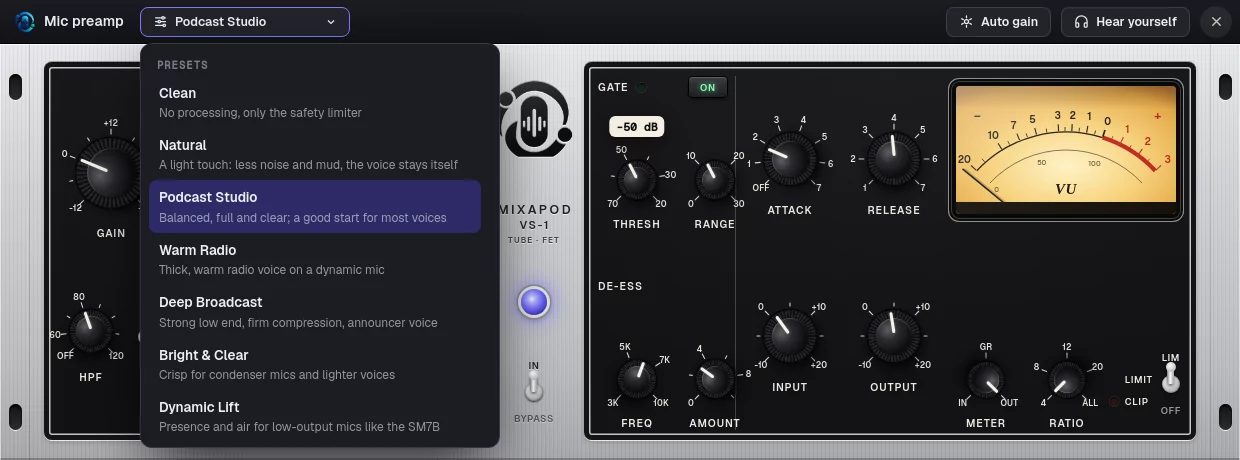
- Presets don’t touch GAIN; gain is set for the microphone.
- When you choose a preset and then turn a knob, a
*appears next to its name. - With Save the current sound as a preset you save your own preset under a name; you can delete it from the menu.
Latency
The preamp delays the sound by 2.5 ms (119 samples): for the filters of the high-quality tube modeling and the limiter’s lookahead. Recording starts and stops that much later, so the files stay aligned with the other participants. The latency is the same in bypass.