
DocsSessions and recording
Production
Dragging the intro music, recordings and outro into order and exporting them as a single podcast file.
Production lines up the pieces of an episode and turns them into one file: intro, conversation, ad break, outro.
Opening it
- Production in the sidebar,
- File › Production… in the menu, or Ctrl+P,
- Add to production on the Recording ready screen.
Production opens in a window that blurs the background. It doesn’t close when you click outside it, so it can’t disappear by accident before you finish.
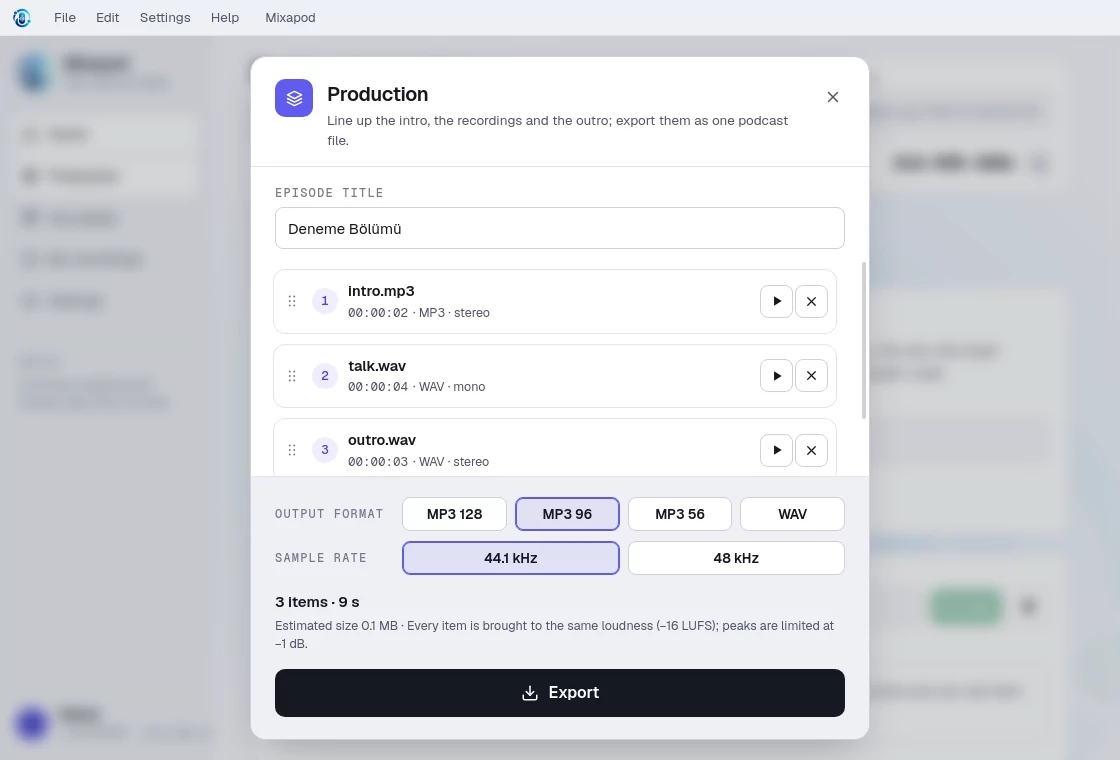
Adding and ordering items
- Drag and drop audio files onto the window, or choose them with Add files.
- Supported formats: WAV, MP3, M4A, AAC, FLAC, OGG, OPUS.
- Grab items and drag them into order; the first item in the list is the start of the file.
- Removing an item from the list doesn’t delete the file.
Audio processing
When exporting, each item is:
- balanced to −16 LUFS on its own (gain is raised by at most +12 dB and lowered by at most −20 dB), so the intro music doesn’t come out louder than the conversation,
- joined with a 10 ms fade at its start and end, so there are no clicks between items,
- passed through a limiter with a −1 dBFS ceiling.
Export settings
| Preset | Description |
|---|---|
| MP3 128 kbps | Standard publishing (default) |
| MP3 96 kbps | Fine for speech |
| MP3 56 kbps | Small file · mono |
| WAV | Lossless · 24-bit (stereo) |
For the sample rate, you can choose 44.1 kHz (default) or 48 kHz. The description of each format appears when you hover over it.
When you press Export, you choose where to save the file; a progress indicator follows the work. When it’s done, you can listen to the file or show it in its folder.
If you close the panel after exporting, the list is empty the next time you open it. If you want to continue with the same items, press Back to the list before closing.
